

You sit down at your computer with a clear plan for the day, but within a few hours your neck starts to hurt, your eyes get tired, and it becomes increasingly difficult to concentrate on a simple task. It seems that the problem is overwork, lack of motivation, or insufficient discipline. However, sometimes the reason is right in front of you - on your desktop.
Points of attention
- The British Health and Safety Executive (HSE) notes that improper use of computer equipment can be associated with pain in the back, neck, shoulders, arms, and eyestrain.
- People who wear bifocals or progressive lenses sometimes need a different screen position. In such cases, it is best to discuss the adjustment with your ophthalmologist or optometrist.
- Working on a couch or in bed can be comfortable from time to time, but for long-term tasks, it is advisable to organize a separate space with proper body support.
An uncomfortable chair, an incorrectly positioned monitor, insufficient lighting, or constant background noise can create additional physical and mental strain, especially if a person spends six to eight hours a day at the computer.
An improperly organized workplace can contribute to muscle discomfort, eye fatigue, and difficulty concentrating. At the same time, properly selected furniture and equipment do not guarantee high productivity - they help eliminate some of the factors that prevent comfortable work.
Experts from the US Occupational Safety and Health Administration (OSHA) emphasize that there is no universal ideal posture for working at a computer. The workplace should be adapted to the height, physical characteristics and nature of the tasks of a particular person.
Let's look at the 12 most common mistakes, explain how they affect your well-being, and find out what can be fixed without buying expensive equipment.
How the workplace affects productivity and health
Ergonomics is an approach to work organization in which equipment, space, and processes are adapted to human capabilities.
For example, if the monitor is too low, the employee is constantly tilting their head. If the desk is too high, they have to raise their shoulders while typing. And when the mouse is far from the keyboard, the hand is regularly in an awkward position.
An isolated movement may not cause problems. But prolonged work without changing posture can increase the strain on muscles and joints.
The British Health and Safety Executive (HSE) notes that improper use of computer equipment can be associated with pain in the back, neck, shoulders, arms, and eyestrain.
However, you should not attribute any pain solely to an uncomfortable chair.
Well-being is also affected by physical activity, psychological stress, previous illnesses, and individual characteristics.

1. You adjust your body to the chair, not the chair to you.
One of the most common mistakes is to sit in a position dictated by the furniture, instead of adjusting it to your own needs.
For example, if the chair is too high, the feet do not reach the floor. The person begins to bend their legs or sit on the edge of the seat.
If the back does not support the lower back, you have to constantly strain the muscles of the torso.
How to properly adjust an office chair
Focus on a few principles:
feet must have stable support on the floor or stand;
the hips should be comfortably placed on the seat;
the backrest should support the lower back;
shoulders should remain relaxed;
It is advisable to leave a small gap between the front edge of the seat and the back surface of the knees.
If the desk is not adjustable, you may need to raise the seat to keep your arms at a comfortable height. In that case, a footrest may be necessary.
It is not necessary to buy the most expensive ergonomic chair. It is much more important whether it can be customized for a specific person.
2. The monitor is positioned too low or high
A common situation: a laptop stands directly on the table, and a person looks down for hours, tilting their head.
The other extreme is a large monitor, the top of which is located well above eye level.
In this position, you have to tilt your head back or change your posture to see the image.
According to OSHA guidelines, the top edge of the monitor should generally be at eye level or slightly lower.
At what distance should the monitor be placed?
A practical guideline is approximately 50–70 centimeters from the eyes, although the comfortable distance depends on the size of the screen, the scale of the text, and the characteristics of your vision.
It is advisable to place the monitor directly in front of you.
If you have to lean forward to read text, try zooming in on the interface first.
People who wear bifocals or progressive lenses sometimes need a different screen position. In such cases, it is best to discuss the adjustment with your ophthalmologist or optometrist.
3. You work on a laptop without additional devices
A laptop is convenient for travel and short-term work. But its design creates an obvious compromise: the screen and keyboard are physically connected.
When the keyboard is at a comfortable height, the screen often ends up being too low.
If you raise your laptop to eye level, typing on its keyboard becomes uncomfortable.
That is why the British HSE recommends using a separate keyboard and mouse for prolonged work.

How to inexpensively improve your workplace with a laptop
To get started, three things are enough:
A sturdy stand that will elevate the screen.
External keyboard.
A separate mouse.
If necessary, you can use an external monitor instead of a stand.
It is important that the design is stable, does not block the laptop's ventilation holes, and does not create a risk of the equipment falling.
Working on a couch or in bed can be comfortable from time to time, but for long-term tasks, it is advisable to organize a separate space with proper body support.
4. The keyboard and mouse make your hands strain.
Even a properly adjusted chair won't help completely if the keyboard is too far away.
For example, a person constantly stretches their arms forward to type, while the mouse lies behind a stack of documents.
As a result, the shoulders remain tense and the wrists are often in an uncomfortable position.
How to place the keyboard and mouse
It is advisable to position the keyboard so that your elbows remain close to your torso, and your forearms and hands form approximately a straight line.
OSHA describes a comfortable elbow position as being in the range of approximately 90–120 degrees.
The mouse should be placed next to the keyboard so that you don't have to constantly move your hand far away.
A wrist rest may be helpful for some users, but it should not force your wrist to bend or create excessive pressure while typing.
If work is accompanied by numbness in the fingers, pain, or weakness in the hand, a medical evaluation is needed, not just a change in the location of the equipment.
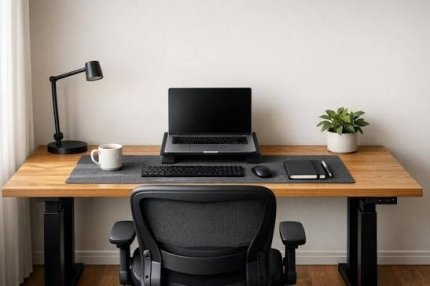
5. You try to sit in one “correct” posture all day.
Ergonomics materials often depict ideal posture: a straight back, right angles in the joints, and symmetrical arm positions.
But even a comfortable position can be tiring if you stay in it without moving for several hours.
The goal of ergonomics is not to force a person to constantly sit still, but to create conditions for comfortable work and regular changes in body position.
Does a standing desk help?
The height-adjustable desk allows you to alternate between sitting and standing.
According to a Cochrane systematic review, such desks can reduce the amount of time spent sitting during the workday.
However, the available evidence is not sufficient to guarantee a reduction in back pain or other musculoskeletal symptoms.
You don't need to stand still all day either.
It is more useful to change positions, move periodically, and choose a pose according to the task.
6. You work non-stop until you get tired.
Sometimes it seems like every break takes time away from an important task.
Therefore, the employee sits at the computer for two or three hours in a row, and only starts to rest when his back hurts or he finds it difficult to concentrate.
However, short changes in activity can help reduce fatigue.
The British HSE recommends taking more frequent short breaks when working behind screens.
As an example, experts give five to ten minutes after about an hour of working at the computer, rather than one long break after several hours.
This is a guideline, not a universal medical norm.
What to do during break
If possible, stand up, walk around, change your body position, or perform another task that doesn't require prolonged screen viewing.
If the work involves intensive typing, a break should not automatically turn into another session with the same workload on the hands.
It is also important not to replace physical rest with continuous smartphone viewing.
7. Improper lighting makes you constantly strain your eyes
Insufficient lighting of the work surface, sharp contrast between the screen and the room, or glare can cause visual discomfort.
For example, a monitor is placed opposite a window. On a sunny day, some of the text is difficult to see, so a person is forced to change the position of their head or increase the brightness of the screen.
Sometimes just rearranging the table is enough to reduce the problem.
How to organize desktop lighting
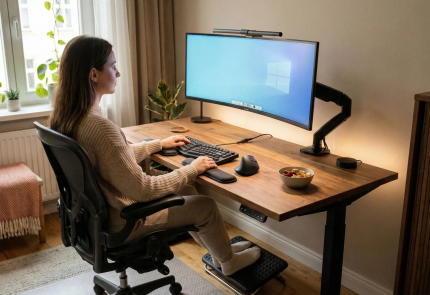
If possible, place the monitor sideways to a window so that direct light does not fall into your eyes and does not create strong glare.
Use curtains or blinds to regulate daylight.
If you are working with paper documents, add local light that does not blind.
It is advisable to adjust the screen brightness according to the room conditions.
There is no one ideal brightness for all people and all types of work.
8. You ignore eye strain and rely on special glasses
Dry eyes, blurred vision, burning, and headaches can occur when using digital devices for extended periods of time.
The American Academy of Ophthalmology explains that people often blink less frequently when focused on a screen.
This can cause the tear film to dry out faster, which contributes to the appearance of unpleasant sensations.
Does the 20–20–20 rule help?
This is a simple practical recommendation: about every 20 minutes, shift your gaze to an object located about six meters away and look at it for about 20 seconds.
This approach helps to regularly change your visual load. However, it should not be seen as a cure for all eye diseases.
The widespread belief that special glasses with a blue light filter necessarily protect against visual fatigue also has no convincing scientific support.
The American Academy of Ophthalmology does not recommend such glasses as a must-have for working at a computer.
If you experience persistent discomfort, pain, or vision impairment, you should consult an ophthalmologist.
9. You can constantly hear other people talking in your workspace.
The sound environment can affect the ability to perform tasks that require concentration.
This is especially noticeable when working with texts, calculations, or complex information.
For example, an employee is preparing an analytical report, while several colleagues are holding a loud meeting nearby.
The brain has to constantly switch between the task and the intelligible speech around it.
How to reduce the impact of office noise
If possible, arrange separate areas for calls and focused work.
For individual tasks, noise-canceling headphones sometimes help.
But music doesn't always improve concentration, especially if it contains lyrics or is attention-grabbing.
Choose the sound environment according to your needs and the nature of your work.
You shouldn't completely isolate yourself from sounds where you need to hear security signals, colleagues, or work messages.
10. You have too much visual stimulation.
A large number of papers, wires, open tabs, and messages can create a feeling of overload.
However, it is important to distinguish between real obstacles and simply an individual style of organizing space.
For one person, a clean desk makes it easier to concentrate. For another, having multiple open documents and notes is a necessary part of work.
There is no convincing evidence to suggest that any object on a desk automatically impairs productivity.
How to organize space without being too minimalist
Start with functionality.
Keep things you use every day within reach.
Remove or organize items that interfere with moving the mouse, working with documents, or using equipment safely.
Pay special attention to digital clutter: notifications, unnecessary windows, and unnecessary messages.
Sometimes turning off unnecessary notifications helps more than buying a new organizer.
11. There is not enough fresh air in the room.
If the meeting room is small, the windows are closed, and the ventilation is not working well enough, people may feel suffocated and uncomfortable.
Air quality depends on the supply of fresh air, pollutants, ventilation performance, and other conditions.
In a study by the Harvard School of Public Health published in 2021, scientists observed a link between air quality indicators in offices and the results of certain cognitive tests.
Higher levels of fine particulate matter PM2.5 and CO₂, which was used as a proxy for ventilation, were associated with slower responses and lower task performance.
However, this is an observational study, so its results do not prove that a certain reduction in CO₂ will automatically increase productivity by a specific percentage.

What can be done?
Check that the ventilation openings are not blocked by furniture.
If conditions permit, ensure fresh air is available.
If there is constant stuffiness or unpleasant odors, contact the building administration to have the ventilation checked.
A CO₂ sensor can help assess ventilation, but it does not detect all pollutants or measure the overall safety of a room.
12. The room temperature constantly causes discomfort
It's difficult to feel comfortable in an office that's too warm, and in a cold room you have to be distracted by the desire to warm up.
However, there is no single optimal temperature for all office workers.
The perception of heat depends on clothing, humidity, air movement, physical activity, and individual characteristics.
How to find comfortable conditions
Do not rely solely on the thermostat reading.
Pay attention to the actual comfort of employees and the ability to regulate the microclimate.
If the temperature differs noticeably in different parts of the office, it is worth checking the operation of the heating and air conditioning.
Do not place heaters near flammable objects and do not overload the electrical network.
This is especially important when using temporary workstations and backup power supplies.
How to properly organize your computer workspace
Start by sequentially setting up furniture and equipment.
| Element | Practical guideline |
| Chair | Adjustable height, back support, comfortable fit |
| Feet | Full support on the floor or stand |
| Elbows | Close to the torso, without constantly raised shoulders |
| Keyboard | In front of you, at a comfortable height |
| Mouse | Right next to the keyboard, no need to reach far |
| Monitor | Top edge approximately at eye level or below |
| Distance to the screen | Approximately 50–70 cm, taking into account the size of the text |
| Lighting | No strong glare or glare |
| Breaks | Regularly changing activities and body positions |
These are guidelines, not strict requirements for every person.
If a certain position causes pain, you don't need to try to hold it just because it looks right on the diagram.
How to set up a workplace at home without spending a lot of money
For remote work, it is not necessary to immediately buy a new desk, an expensive chair, and a large monitor.
First of all, assess what exactly is causing the discomfort.
If your neck hurts
Check the height of the screen and the need to constantly tilt your head.
For a laptop, a sturdy stand along with an external keyboard can help.
If your hands get tired
Move the keyboard closer and check the height of your work surface.
Sometimes it is enough to change the position of the mouse.
If your eyes get tired quickly
Adjust the screen brightness, eliminate glare, and check the text scale.
It is not necessary to start by buying special glasses.
If there is no separate room
Try to create a small, permanent work area, even if it's part of a shared space.
It is helpful to agree with your loved ones about a time when you need to focus.
However, organizing the table alone will not solve the problem of systematic overload with family and professional responsibilities.
Working with two monitors: how to avoid constant neck strain
Using two screens can be convenient for programming, analytics, design, and other tasks.
But the wrong position forces you to constantly turn your head.
If you use one monitor a lot, place it directly in front of you.
Place the second one on the side, as close as possible to the main one.
If both screens are used equally, you can install them side by side to minimize neck rotation.
It is also worth coordinating the interface scale and image height.
You don't need to constantly turn your head to the screen, which is located far to the side.
Do ergonomic accessories help: what is really worth buying?
Additional equipment can be useful, but only when it solves a specific problem.
| Accessory | When can it help? | What to consider |
| Laptop stand | The screen is too low | Requires a separate keyboard for extended use |
| Footrest | Feet do not have stable support | Should not restrict position change |
| Monitor stand | Need to change screen height | Must be stable |
| Vertical mouse | A regular mouse causes discomfort for some users | Does not guarantee pain relief |
| Height-adjustable desk | You need to alternate sitting and standing. | Does not replace movement and breaks |
| Noise-canceling headphones | Extraneous conversations interfere | It is necessary to maintain the ability to hear important signals |
There is no need to buy all the accessories at once.
It is better to gradually check whether a certain change really improves comfort.
If existing illnesses or individual physical limitations affect work, equipment selection may require consultation with an appropriate specialist.
What to do if your neck or back constantly hurts after work
Not every pain is related to improper posture at the computer.
Possible factors include muscle strain, physical activity, previous injuries, and other medical conditions.
If discomfort recurs, it is worth assessing the working conditions and consulting a doctor.
Medical attention is especially important if the pain is accompanied by numbness, weakness in the limbs, coordination problems, or other neurological symptoms.
You should not self-diagnose osteochondrosis just because of pain after work.
Similarly, you should not start intensive exercises, massages, or medications without consultation if the cause of the symptoms is unknown.
How to improve your workplace in one day: a practical checklist
It is not necessary to carry out a complete reconstruction of the office.
Start with ten simple checks:
Check if your lower back has comfortable support.
Make sure your feet are on the floor or a stand.
Place the main monitor directly in front of you.
Adjust the screen height and text scale.
Place the keyboard and mouse closer to your body.
Reduce glare on the screen.
Remove objects that interfere with movement or work.
Check if there is enough fresh air.
Take regular short breaks.
Identify what issues need to be resolved together with the employer.
After making changes, monitor your own well-being for a few working days.
If the discomfort persists, don't experiment endlessly with the height of the table - it's better to get a professional assessment.
Five myths about ergonomics and productivity
Myth 1. Perfect posture completely protects against pain. Even a comfortable position should not be maintained without movement all day. The causes of pain can be different.
Myth 2. The most expensive chair is always the best. Adjustability and individual needs are important.
Myth 3: Standing is necessarily better than sitting. An adjustable desk helps reduce sitting time, but it doesn’t guarantee the elimination of musculoskeletal pain.
Myth 4: Blue light glasses protect your eyes from computer use. There is no convincing evidence that this is beneficial for reducing digital eye strain.
Myth 5. If your desk is perfectly organized, productivity will definitely increase. The result is also influenced by workload, task clarity, sleep, psychological state, and management processes.
Conclusion
A properly organized workplace starts not with expensive equipment, but with attention to your own comfort.
Monitor height, arm position, back support, lighting, air quality, and the ability to change posture regularly are all worth evaluating if you spend a lot of time at the computer.
Some problems can be solved in a few minutes by simply rearranging your monitor or keyboard. Others require changes to your office layout, ventilation, or work schedule.
The main principle of ergonomics is that the workspace should adapt to the person, and not force them to work constantly due to discomfort.
FAQ: frequently asked questions about proper workplace organization
How to properly organize a computer workstation?
Start by adjusting your chair, back support, and foot position. Place your monitor directly in front of you, your keyboard and mouse at a comfortable distance. Make sure there is lighting, ventilation, and regular breaks.
At what height should the monitor be?
For most users, the top of the screen should be at or slightly below eye level. The exact setting depends on the size of your monitor, your vision, and the glasses you use.
What is the correct distance from your eyes to the monitor?
A practical guideline is approximately 50–70 centimeters. However, the comfortable distance depends on the screen diagonal, font size, and individual needs. The text should be easy to read without leaning forward.
How to sit at the computer correctly to avoid back pain?
It is important to provide support for your lower back, support for your feet, and comfortable arm positions. Change your position regularly and take breaks. If the pain recurs or worsens, see a doctor.
Is it beneficial to work at a computer while standing?
Alternating between sitting and standing can help reduce the total amount of time spent sitting. However, scientific evidence does not guarantee that it will eliminate back pain. It is important not to stand still for long hours.
How often should you take breaks while working at the computer?
The UK HSE recommends taking short, regular breaks or changes in activity. A guideline is five to ten minutes every hour or so. The exact frequency will depend on the nature of the work and individual needs.
Why do my eyes hurt after working at the computer?
Causes may include prolonged concentration at close range, decreased blinking, dry eyes, glare, or uncorrected vision problems. If symptoms persist, it is worth seeing an ophthalmologist.
How to properly arrange a workplace with a laptop?
For extended work, it's convenient to elevate the screen on a sturdy stand and use an external keyboard and mouse. This allows you to adjust the screen height and hand position separately.
Does clutter on your desk really reduce productivity?
Too many distractions can make it difficult for some people to concentrate. However, there is no universal requirement to work at an empty desk. It is more important to remove what actually interferes with work and safety.
What is the first thing you should change in the workplace without spending a lot of money?
Check your screen height, keyboard distance, footrests, and lighting. Adjust text size and take short breaks if necessary. Many of these changes don’t require buying new equipment.
Important: This article is for informational purposes only and is not a substitute for the advice of a physician, ophthalmologist, physical therapist, or other qualified professional. Self-treating back, neck, joint, or vision problems can be harmful to your health. If symptoms persist, worsen, or are accompanied by numbness, weakness, loss of sensation, or other worrisome symptoms, consult your doctor first. Ergonomic recommendations should be tailored to your individual health and specific work environment.

